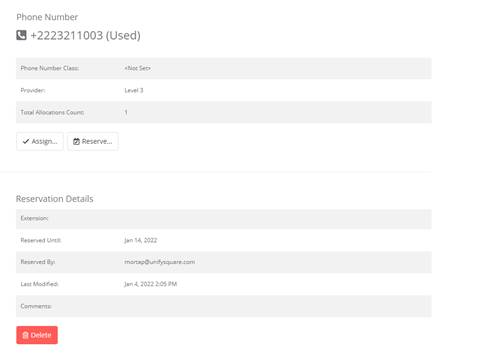
To delete a Phone Number Reservation:
1. Follow the steps in adding a phone number reservation to display the phone number details.
2. Select the Status and Allocation Type to reflect all the reserved numbers
3. Click on the Phone number that you want to delete
4. The Reservation Details would include –
o Extension
o Reserved Until
o Reserved by
o Last Modified
o Comments
5. On the Phone Numbers details page Select Delete of the corresponding Reservation
IMPORTANT:
Deleting the phone number reservation cannot be undone.
6. Select Delete if you wish to continue deleting the reservation.
7. If you want to delete the Tombstone select Yes.