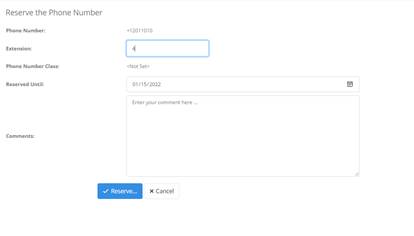
Available phone numbers with the status of Available can be reserved. To reserve a phone number:
1. Follow the steps in searching and viewing phone number to display the phone number details.
2. Select the available phone number you wish to reserve.
3. Select Reserve.
4. Add the extension if any
5. Select a Reserved Until date for the reservation to be removed.
6. Optional: Enter a comment.
7. Select Reserve.
8. Select Close.