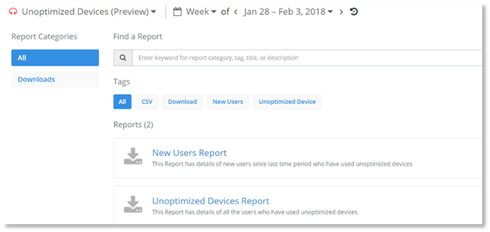
The PowerSuite Operations Dashboard Report page provides the following reports for download:
- New Users Report
The report contains information on only the users who have recently started using an unoptimized device during the selected time period. The report also details the devices used. This report is available for Skype for Business.
- Unoptimized Devices Report
The report contains information of all users who have used unoptimized devices during the selected time period, including the users who are reported in the New Users report. The report also details the devices used. This report is available for Skype for Business.
- Usage by User
This report contains usage details by user such as information on calls, sharing and organized conferences during a selected time period. This report is only available for zoom.
NOTE:
The reports track devices used by internal users only. The information detailed in the reports is based on information provided by the Skype for Business Quality of Experience monitoring server. The information provided in these reports should not be used for calculating the number of calls made by users, owing to the fact that the Skype for Business Quality of Experience monitoring server does not report the Quality of Experience information for every call.
The reports may be used to determine who is consistently using an unoptimized device. Once you have viewed the report, further research on the behavior of an individual user can be carried out using PowerSuite Help Desk or PowerSuite Call Explorer, to determine if targeted outreach to educate end users is necessary.
The following may also be taken into consideration while carrying out your research:
- While using an optimized device is an important part of the Skype for Business experience, in some scenarios, devices may not yet be complete in the Microsoft’s certification process.
- The end user may be in “Listen only” mode and not is not impacting call experiences for other users.
NOTE:
Unoptimized devices are not available for Microsoft Teams or Skype for Business Online.