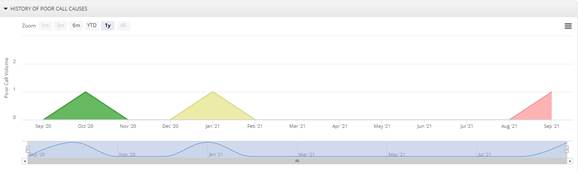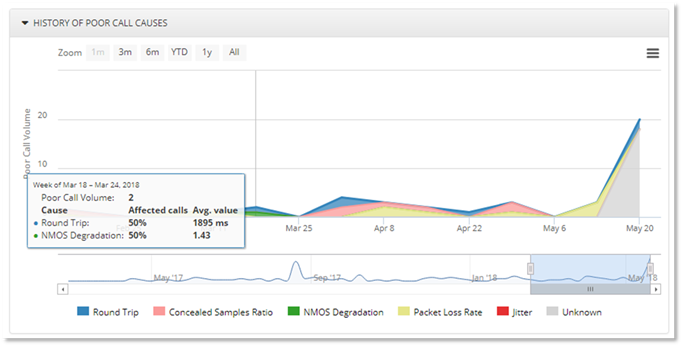
The History of Poor Calls chart displays the causes of the poor calls providing information on the percentage of the poor calls are caused by:
- Round Trip (ms)
Network Round Trip time is the most common measure of Latency. When latency is high, users will likely hear the words, but there will be delays in sentences and words that may cause talk-over or unnatural conversation breaks and timing.
- Ratio Concealed Samples (%)
Concealed Samples Ratio (%) is the percentage of lost, late, or out of order packets that were concealed. Concealing audio samples is a technique used to deal with dropped network packets.
- Degradation
Average Network MOS degradation is an integer represents the amount of the MOS value lost due to network conditions.
- Packet Loss (%)
Packet Loss represents the % of packets that did not make it to their destination. Packet loss will cause gaps in the audio.
- Jitter (ms)
Jitter measures the variability of packet delay and results in a robotic or choppy audio experience. Jitter can increase latency on networks.
This information will help you determine the cause of the majority of the poor calls. Hover over the chart to display the actual percentage of the causes of the poor call data for a particular date.
To display the data by daily trend of poor calls, use the
 button when selecting the
month option on the top of the dashboard
button when selecting the
month option on the top of the dashboard 
When the week time period is selected at the top of the
dashboard to display the data by day use the  button.
NOTE:
The dashboard will display the data based on the time period
selected using the 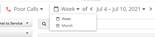 button at the top of the
dashboard.
button at the top of the
dashboard.
The data collected, retained by PowerSuite by day displays a month worth of data. However up to 30 day worth data can be viewed when selecting older dates.
- When the time period Month is selected ,12 months of data can be viewed.
- When the time period Week is selected, 30 days data will be displayed.
Example:
When time period Month of September is selected and choose the Month in the display trend, below history of Poor Call Causes will be generated.