Throttling permits the control of the maximum number of users to be changed per RulesEngine.exe. Throttling may be accessed in 2 different ways:
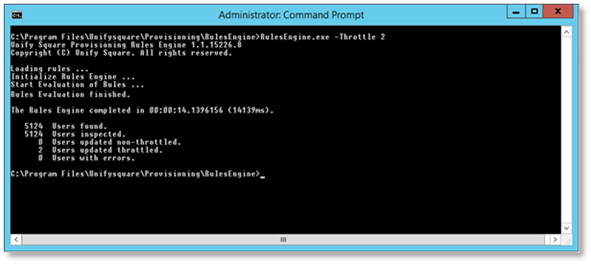
1. As a command line option using the “-Throttle <int>” with the RulesEngine.exe command.
Example:
To allow a maximum of 2 users to be changed per RulesEngine.exe execution set the command to “RulesEngine.exe –Throttle 2”
Or
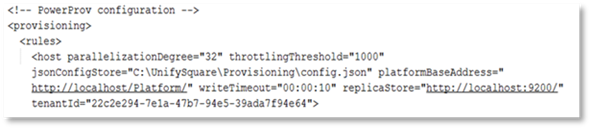
2. Setting the “ThrottlingThreshold” value Via the RulesEngine.exe.config file, located in the folder %ProgramFiles%\UnifySquare\Provisioning\RulesEngine.
Example:
To allow a maximum of 1000 users to be changed per RulesEngine.exe execution:
1. Open file %ProgramFiles%\UnifySquare\Provisioning\RulesEngine\RulesEngine.exe.config.
2. Navigate to entry throttlingThreshold.
3. Set the value for throttlingThreshold to the desired default throttling value (1000 in this example).
4. Save the changes to the file.