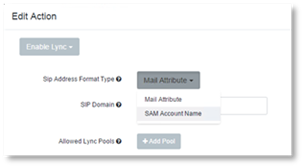
The SIP Address Format Type setting is used to determine how a SIP address is generated and which format the existing SIP addresses must adhere to.
The following options are supported for Lync or Skype for Business:
- samAccountName-based SIP address generation
- MailAttribute
o The user’s account Active Directory mail attribute. The domain of the mail address must be a valid SIP domain. If the domain of the mail address is not a valid SIP domain, then the SIP domain parameter must be used. Example: JLewis@cordant.com, is used as the SIP address.
o This format requires the mail attribute from Active Directory to be synchronized.
To set the SIP address:
1. Select the SIP Address Format Type.
2. In the SIP Domain field enter the Sip Domain. Example:cordant.com
If a SIP address cannot be generated, then the enable Lync task will fail and the user will not be changed.
If an Enable Lync Rule is applied to a user account that is already enabled, then the SIP address will be rechecked and changed if necessary. Additionally, if the user is not in one of the allowed pools, then the user’s pool will also be changed.