Rules in Provisioning Solutions are evaluated from the top down. For a specific setting, (Example: Voice Policy) the last Rule with a matching Condition is the successful Rule.
It is recommended to order the Rules from least specific to most specific Conditions.
To set the order of the Rules:
1. Click on the Rule you wish to change the order of.
2. Click on the Rule you wish to modify.
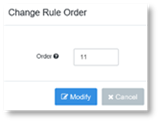
3. In the Change Rule Order dialog add the number that you wish the Rule to now be.
Example: Rule 9 is now to become Rule 11, type 11 in the Order field.