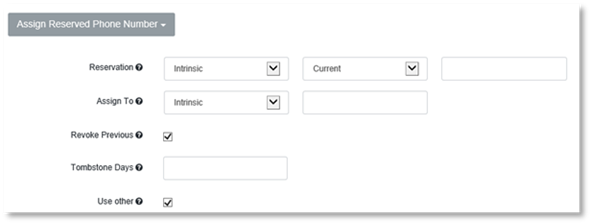
1. Click on Assigned Reserved Phone Number.
2. Select the Intrinsic, Custom or Derived in the first reservation field.
3. Select Current or Unmodified in the second Reservation field.
4. Enter the property in which the reserved phone number is expected to be stored, in the last reservation field.
5. Select Intrinsic or Custom in the first Assign To field.
6. Enter the property where the assigned phone number will be written in in the last Assign To field.
7. Select Revoke Previous, if you wish to revoke the previous phone number the Action applies to.
8. Enter the number of Tombstone days that the previously assigned phone number is to remain tombstoned.
9. Check Use Other if there is no phone number reserved for the user. If checked, another available number will be used in that case.
10. Click Create.