The Lync or Skype for Business Server Registrar is a server role that provides routing services and enables client registration and authentication.
One or more pools on which the user is homed must be
specified.
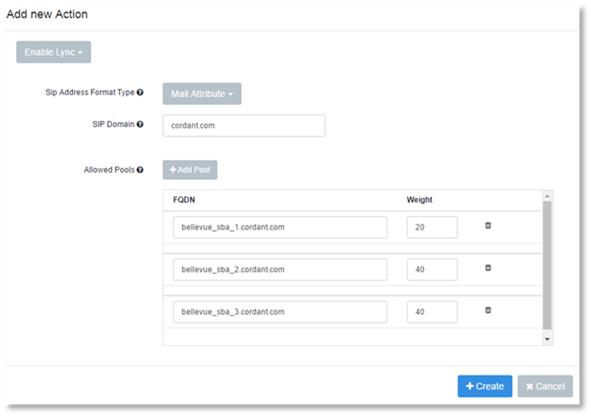
A "pool" is the fully qualified domain name (FQDN) of a pool.
If more than one pool is specified, new or moved users will be distributed across the list according to the weight provided. Weight is set for each pool in the Rule Action definition. The default is set to 1. If the weight field is empty, the Rule will not be able to be saved.
To set the Allowed Pools Setting
To set the allowed Pools:
1. Click Add Pool.
2. Enter the FQDN name.
3. Enter the weight you wish to assign to the FQDN.
Example:
A large site has three Survivable Branch Appliances (SBA’s), which have identical hardware and are connected to an equal amount of voice channels.
A Rule with SBA1, SBA2 and SBA3, but without any specified weights, will cause Provisioning Solutions to enable new users on the SBA with the least amount of users.
Assuming that SBA1 is older and will only be used by 20% of the users. A weight can be specified for each SBA. Using values 20 for SBA1, 40 for SBA2, and 40 for SBA 3 will cause Provisioning Solutions to enable users on SBAs 2 and 3 only, until the desired distribution has been reached.
The list of pools specifies which pools are permitted for a given user. Provided a Rule applies to a user that is homed on a pool that is not within the allowed list, the user will be moved by Provisioning Solutions. Users who are homed on a pool that is on the allowed list will not be moved. The move operation will also move meeting content, but will not be forced. For example, if the source pool is not available, the operation will fail and the user will remain registered to the current pool. If a move operation is conducted, the new pool is selected.