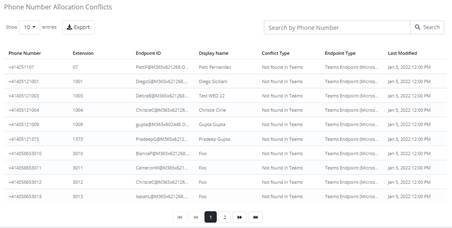
The number Phone numbers that have conflicts. The list will provide detailed description such as conflict type and the endpoint associated with it. The table displays fields such as the phone number, extension, Endpoint ID and conflict type.
You can search by Phone Number and export the data in csv format.
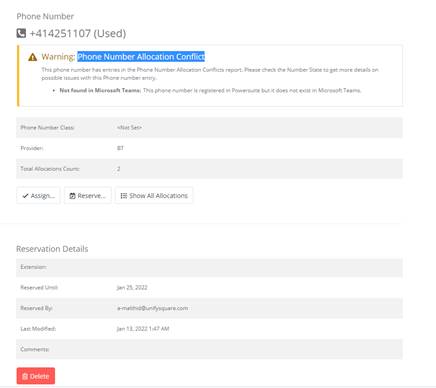
When a Phone Number is selected it will display Phone and the Reservation details along with a warning message
Below is the list of phone number allocation conflict types:
•Unmapped in PowerSuite: a Phone Number assigned on a Platform does not have a corresponding Allocation in PNMS (Phone Number Management System).
•Mismatch with PowerSuite: the same Phone Number is assigned to different Endpoints on a platform and in PNMS.
•Not found in Platform: An Allocation does not have a corresponding assignment on a Platform.
•Reserved in PowerSuite: a Reservation was found in PNMS for a Phone Number already assigned on a Platform.
•Vendor mismatch: a Phone Number was allocated for a different Platform from the one on which it is currently assigned.
•Tombstone in PowerSuite: a Tombstoned Allocation was found for a Phone Number which is currently assigned on a Platform.
•Tombstone for different Endpoint ID in PowerSuite: a Tombstoned Allocation was found for a Phone Number which is currently assigned on a Platform to a different Endpoint.
•Tombstone for different Vendor in PowerSuite: A Tombstoned Allocation was found for a Phone Number which is currently assigned on a different Platform than the Allocation lists.
•Tombstone for different Endpoint ID and Vendor in PowerSuite: a Tombstoned Allocation was found for a Phone Number which is currently assigned on a different Platform and to a different Endpoint than the Allocation lists.
•Vendor and Endpoint ID conflict: the same Phone Number is assigned to a different Endpoint and on a different platform than what is listed in PNMS.