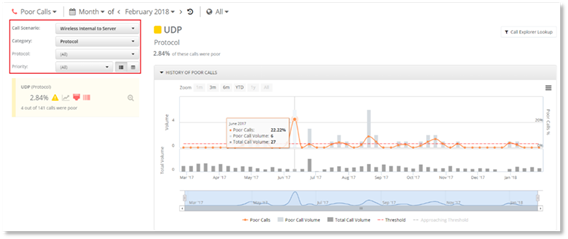
The filters are located at the top left of the Poor Call dashboard page. The Call Scenario and other filters enable you to select call scenarios that you wish to view, and to drill down the data to display the prioritized Poor Call cards. Use the drop-down arrows to select the filters.
Call Scenario Filter
The Poor Calls information can be filtered by call scenarios, which have meaningful impact to the end users call quality and are consistently measurable and actionable.
Category Filter
Once the call scenarios filter has been selected the call scenario can then be filtered using the following categories:
- Protocol
o Transmission Control Protocol (TCP). Calls routed over TCP represent cases of sub-optimal routing and often result in having poor quality
o User Data Protocol (UDP). The User Data Protocol (UDP) represents the majority of the calls
o Unknown
- Type Pair
PowerSuite displays the traffic between different types of servers, including Mediation Server, Gateway, etc.
- Site Pair
If site mapping is configured within Skype for Business and Microsoft Teams in PowerSuite, the Site Pair filter will provide the volume and Poor Call % of calls for each pair of sites hosting the Skype for Business and Microsoft Teams infrastructure servers.
- Client Version
The Client Version filter will filter the calls based on the values reported for the version of the Skype for Business and Microsoft Teams client used by the user making calls. The client version values are examined so that they include only relevant information.
- Connectivity
PowerSuite marks Direct Connectivity with high priority as it is considered a general category of connectivity that all calls should fall into. PowerSuite considers Relay Connectivity as a warning sign for internal traffic.
- Domain
The domain filter provides the ability to filter all the calls in and out of the particular Federated domain.
- Site
If site mapping is configured within Skype for Business and Microsoft Teams or in PowerSuite, the Site filter will provide the volume and Poor Call % of calls for the list of sites.
- Subnet
The Subnet filter enables you to filter subnets that are part of the internal corporate network.
- Sub-Scenario
The Sub-Scenario filter enables you to filter common sub categories of network traffic. Example Internal Wired to Internal Wired and Internal to External.
- WiFi Device Driver
This WiFi Device Driver filter reports single value that links the version of the wireless adapter and the driver version, to enable unique identification of such combination.
- BSSID
The Basic Service Set Identifier is the MAC address of the wireless access point. It may be used to identify the physical wireless access point.
- User
PowerSuite displays a list of users who are company employees performing calls.
- WiFi Band
The WiFi band filter will filter the calls made through WiFi based on the values reported with Microsoft Teams platform.
- Client Type
The Client Type filter will filter the calls based on the values reported with Microsoft Teams when used by the users making calls.